icon AI Image Editing Made Simple

AI Photo Restoration Tool

Instantly restore old, damaged, and blurry photos with our advanced AI. Remove scratches, repair tears, colorize black and white images, and reconstruct facial details with professional precision.

Restore Your Photos
icon See the AI Magic in Action

From Damaged to Crystal Clear

Witness the transformation. Our deep learning algorithms analyze millions of pixels to detect damage, missing details, and blur. It then intelligently reconstructs constraints, sharpens details, and applies natural colorization—turning a faded, torn memory into a vibrant, high-definition masterpiece.

Restored photo after AI enhancement - colorized, repaired, clear family portrait Damaged old photo before restoration - torn, faded, black and white family portrait

Drag the slider to compare: Damaged original vs AI-restored result

icon Why Choose iSamur.ai?

Why Choose Our AI Photo Restoration Tool?

Leveraging state-of-the-art Generative Adversarial Networks (GANs), iSamur.ai delivers professional-grade photo restoration, denoising, and face enhancement instantly.

AI Enhancement

Deep Face Reconstruction

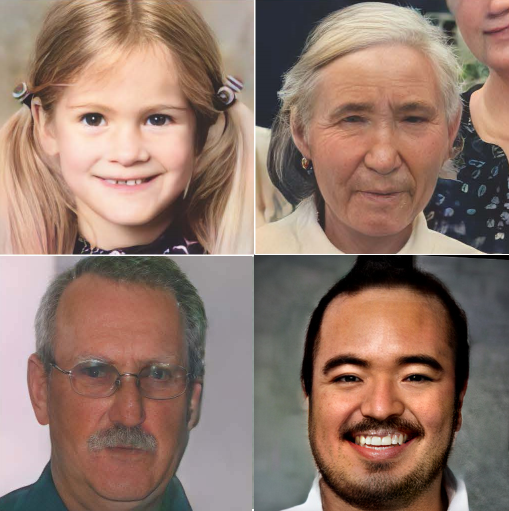
Unlike simple filters, our AI understands facial structures. It reconstructs eyes, nose, and mouth details from blurry or low-resolution inputs, delivering photorealistic and sharp portraits.

Easy Restoration

One-Click Simplicity

No Photoshop skills needed. Upload your photo, choose your mode, and let AI do all the heavy lifting in seconds.

High-Quality Output

4K Upscaling & Denoising

Increase your image resolution by up to 400% without quality loss. Our AI effectively removes grain and digital noise, making your photos suitable for large prints and HD displays.

icon What Can You Do?

Powerful AI Image Editing Use Cases

From fixing old family photos to making your selfies look professional—our AI handles it all.

🖼️

Restore Old & Damaged Photos

Got a torn, scratched, or faded photo? Our AI reconstructs missing parts, removes scratches, and brings clarity back to your precious memories.

🎨

Colorize Black & White Pictures

Transform vintage black & white photos into vibrant, full-color images. See your grandparents' wedding or historical moments come alive.

Enhance Faces for Photogenic Looks

Make portraits camera-ready. Our AI enhances skin texture, lighting, shadows, and facial details to give you that professional, photogenic glow.

🔍

Fix Blurry & Low-Quality Images

Took a photo in low light or with a shaky hand? Our AI sharpens details, reduces noise, and brings back the clarity you thought was lost.

📐

Upscale & Enlarge Images

Need to print a small image in large format? AI upscaling increases resolution without pixelation, perfect for printing or digital use.

👤

Perfect Profile Pictures

Upgrade your LinkedIn, Instagram, or dating profile with AI-enhanced portraits that make you look your best—naturally and professionally.

icon Simple 3-Step Process

How to Restore & Enhance Your Photos

1

Upload Your Photo

Drag and drop your damaged, old, or low-quality image into our tool.

2

Choose Your Mode

Select "Image Restore" for old photos or "Face Enhance" for portraits.

3

Download Your Result

In seconds, download your beautifully restored or enhanced image.

icon Start Restoring Today

Don't Let Your Memories Fade

Every damaged photo is a story waiting to be told. Every blurry selfie is a moment that deserves clarity. Let our AI bring your images back to life—it takes just seconds.

Try Image Restorer
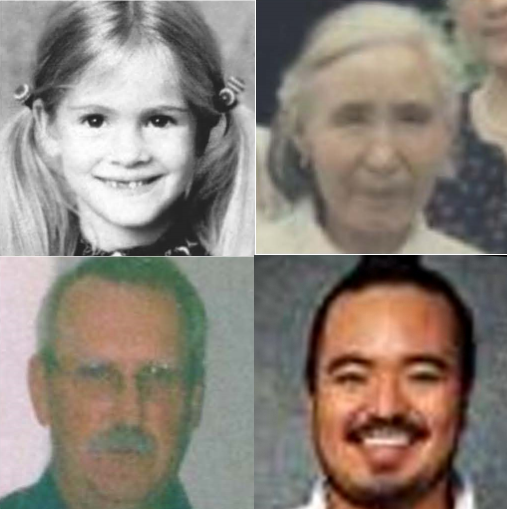
Face before enhancement Face after AI enhancement
shape shape blur blur blur shape

Free AI Photo Restoration Online

Bring your treasured memories back to life with free AI photo restoration online. Whether you have old family portraits, damaged childhood pictures, faded wedding photos, or blurry snapshots, iSamurai makes the restoration process simple and fast.

Our AI photo restoration tool uses advanced deep learning technology to repair scratches, remove blur, improve facial details, and restore missing parts of an image in seconds. You no longer need expensive editing software or professional retouching services.

With AI restore old photos technology, you can easily repair torn and faded photographs, remove scratches and stains, sharpen blurred portraits, and improve brightness and detail. Even images that seem permanently damaged can often be restored into clear, vibrant memories.

Step 1 - Upload Media

AI Photo Restoration – Restore Old Photos Online for Free

iSamurai offers AI photo restoration online for free directly in your browser. There is no complicated setup, and you do not need design or editing experience.

Simply upload your image, let the AI analyze the damage, and receive a fully restored version in moments. The tool works on:

  • Old family photographs
  • Vintage black-and-white images
  • Damaged printed pictures
  • Low-quality digital photos
  • Scanned documents and portraits

Unlike traditional editing software, our AI automatically recognizes missing details and rebuilds them naturally. This makes iSamurai a faster and easier solution for anyone who wants to restore old photos online for free.

You can also use the platform together with other creative features such as AI face enhancement, make video slow motion, and view pricing to explore even more possibilities.

Step 1 - Upload Media

Hard-to-Restore Old or Damaged Photos?

Some images are especially difficult to repair because they are severely faded, blurry, torn, or damaged over time. iSamurai is designed to handle even challenging restoration projects.

Our system can work with:

  • Torn or cracked family photos
  • Water-damaged or stained images
  • Extremely faded vintage photographs
  • Old black-and-white portraits
  • Very blurry or low-resolution images

Even if your original image looks beyond repair, our AI photo restoration tool can often recover details you thought were permanently lost.

Why is AI Photo Restoration Recommended?

Traditional photo editing often takes hours and requires advanced software. AI photo restoration is recommended because it offers a faster and easier way to recover damaged images. In just a few seconds, you can restore an old photo, improve its clarity, and create a version that looks much closer to the original.

Because the tool works online, there is no need for Photoshop or complicated editing programs. Whether you are preserving family memories or improving personal pictures, AI photo restoration online free provides high-quality results that are accessible to everyone.

Frequently Asked Questions

What is AI Photo Restoration, and how is it different from other tools?

AI photo restoration uses artificial intelligence to automatically repair and enhance damaged images. Unlike basic editing tools or filters, it can detect tears, scratches, blur, and missing details, then rebuild the image naturally for more realistic results.

Can I restore old family photos that are faded or torn?

Yes. iSamurai is designed to restore old family photos that are faded, torn, scratched, or damaged over time. The AI can repair missing sections, sharpen details, and improve overall clarity.

Is there a limit on the number of photos I can restore at once?

The number of photos you can restore may depend on the plan you choose. Basic users can restore individual photos, while higher plans may allow batch processing and multiple uploads at the same time.

How long does it take to restore a photo online?

Most photo restorations are completed within a few seconds. Larger or heavily damaged images may take slightly longer, but the process is still much faster than manual editing.

Do I need to download any software to use AI photo restoration?

No. iSamurai works completely online, so there is no need to install or download software. Simply upload your image from your browser and begin restoring it instantly.

Will restoring a photo reduce its quality?

No. The goal of AI photo restoration is to improve image quality. The AI sharpens details, reduces blur, and can even increase the resolution of your photo for better results.

Can I restore black-and-white or vintage photos?

Yes. The tool works especially well with black-and-white and vintage images. You can restore damage, improve clarity, and even colorize old photographs if desired.

Is AI photo restoration free to use?

Yes. iSamurai offers AI photo restoration online free so you can try the tool and preview your results before deciding whether you need additional features.

Can AI Photo Restoration handle very low-quality or blurry photos?

Yes. Even if your image is blurry or low resolution, the AI can sharpen important details and improve facial features. Results may vary depending on the condition of the original photo.

Are my photos safe when I use AI Photo Restoration online?

Yes. Your uploaded images are processed securely. iSamurai is designed to protect your privacy while you use the AI photo restoration online free tool.