Table of Contents
- Why Accuracy Is the Real Metric in AI Face Swap
- The Hidden Bottleneck: Face Detection
- The iSamurai Slime Models: Built for Real-World Footage
- Slime Mini vs. Slime Pro: Which Mode to Pick
- How to Get the Most Accurate AI Face Swap
- Frequently Asked Questions (FAQ)
(Note: AI face swap tools evolve constantly. This guide reflects the landscape as of Q2 2026, with a focus on the technical factors that actually drive swap quality — not marketing claims.)
Everyone searching for the most accurate AI face swap in 2026 keeps landing on the same surface-level comparisons: resolution, video length, watermarks. Those matter, but they’re not what separates a studio-grade swap from an obvious fake. The real factor nobody talks about is the face detection model — the silent engine deciding whether your swap even has a chance of looking right.
In this guide, we’ll break down why detection is the true ceiling on swap quality, how iSamurai’s proprietary Slime models beat the industry-standard detector on real-world footage, and how you can get the best possible output regardless of the material you’re working with. If you want to skip ahead and test it yourself, you can try iSamurai’s face swap tool here.
Why Accuracy Is the Real Metric in AI Face Swap
Most creators treat a face swap as a one-click operation: upload source, upload target, click swap. When the output looks off — ghosting around the jawline, a mismatched eyeline, a face that snaps to the wrong angle — they blame the swap model itself. But in nearly every case, the swap model did its job perfectly. The problem happened one step earlier: the detector either missed the face, locked on to the wrong landmarks, or failed to find the face at all on a non-frontal frame.
This is the reality of modern face swap pipelines. The “swap” is the last step, not the first. Before any pixels change, a detection model has to find the face, extract landmarks, and produce an identity embedding. If that first step is weak, nothing downstream can fix it. That’s why the most accurate AI face swap isn’t the one with the flashiest swap network — it’s the one with the strongest detection stage.
The Hidden Bottleneck: Face Detection
The vast majority of AI face swap apps on the market — including several popular names covered in our 2026 roundup of the top face swap apps — rely on the same off-the-shelf detector: a variant of SCRFD-10G. It’s fast, well-documented, and good enough for perfectly lit studio headshots. But the moment you throw it anything real — a tilted head, a three-quarter angle, dramatic lighting, motion blur, partial occlusion from hair or hands — it starts dropping detections silently.
Silent failures are the worst kind, because the app doesn’t error out. It just skips frames, produces half-swapped footage, or locks on to the wrong face entirely. The result is the uncanny “almost-right” look you’ve seen from every legacy tool. If you’ve ever wondered why your favorite clip refused to swap cleanly on a simple head turn, this is why.
The iSamurai Slime Models: Built for Real-World Footage
iSamurai is the only cloud face swap platform in 2026 running a proprietary, in-house detection stack instead of an off-the-shelf model. Our Slime-Mini and Slime-Pro detectors are remodeled variants of the SCRFD architecture, rebuilt around a higher-dimensional embedding space (512-dim on Pro vs. the legacy 256) and retrained on a proprietary dataset heavily weighted toward non-frontal, non-studio faces. We also replaced the original classification loss with a margin-based variant, which tightens identity separation inside the embedding manifold.
Translation: the models produce a richer, cleaner identity vector, so the swap pipeline has significantly more to work with. The practical impact is measurable — on our internal benchmarks, Slime-Mini delivers 63% higher detection accuracy than the legacy SCRFD detector, and Slime-Pro pushes that to 79% on difficult content (tilted heads, profile angles, low light, and partial occlusions).
Here’s the difference in a single frame. Same source image, same target frame, same swap pipeline — only the detection model changes:
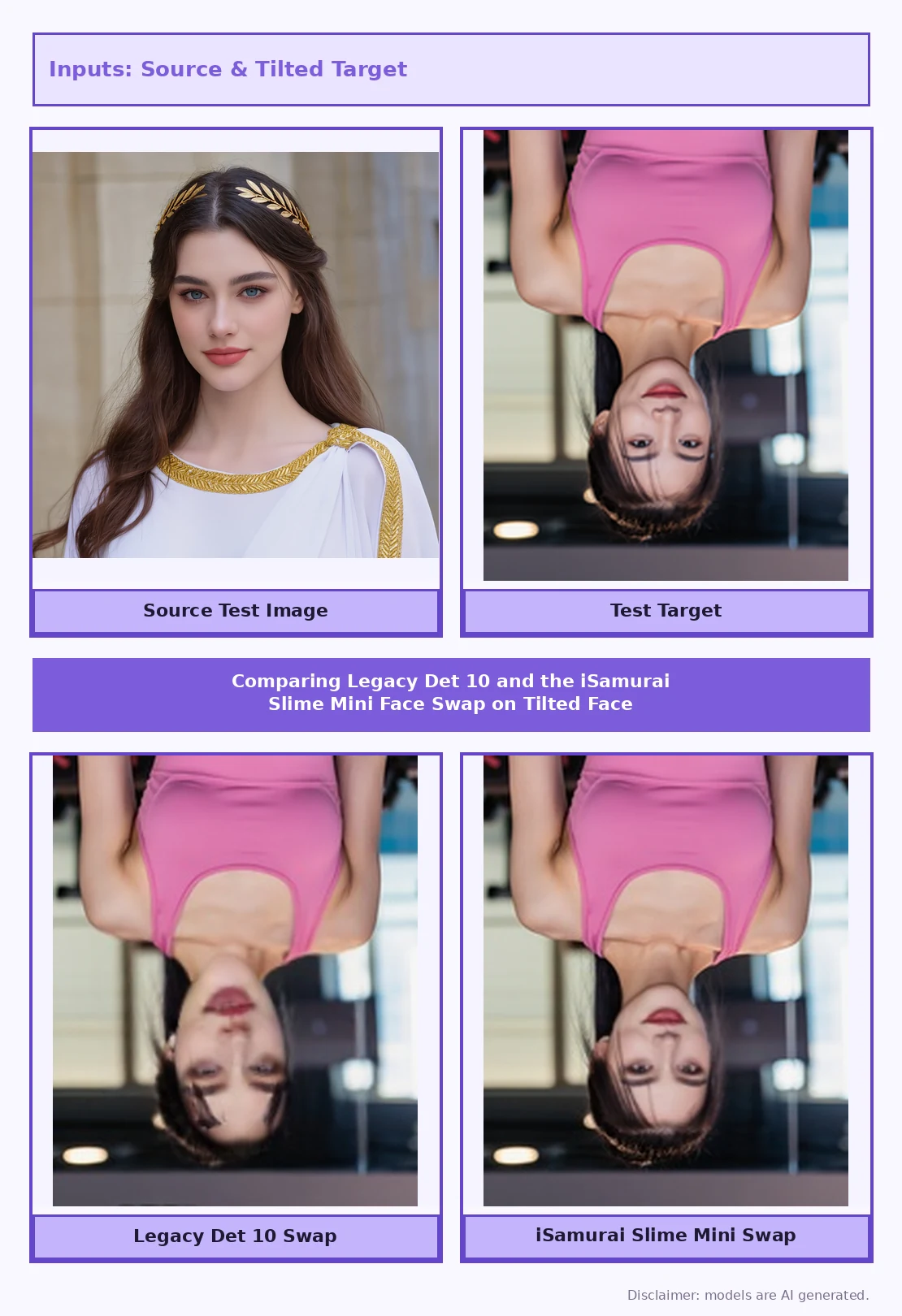
The legacy detector completely misses the face on the left. The Slime Mini swap on the right is clean, identity-accurate, and correctly aligned. This is the kind of real-world content — a head turned at an angle — that every other tool on the market fumbles.
Slime Mini vs. Slime Pro: Which Mode to Pick
Slime isn’t one model — it’s a family, with three modes you can choose per job:
- Fast (legacy SCRFD-10G) — the industry baseline. Use this only for perfectly frontal, well-lit images where throughput beats quality.
- Standard (Slime-Mini) — our proprietary detector, running at the same speed as legacy SCRFD but with 63% higher accuracy. This is the default and the right choice for 95% of real-world jobs.
- Pro (Slime-Pro) — the flagship. About 50% slower than Mini but delivering the highest accuracy on our platform. Reserve this for anything you’re publishing: long-form video, client work, cinematic content, or any shoot with heavy motion and varied angles.
Mode selection lives inside Advanced Settings on the target media. For a full walkthrough, see our guide to getting the best results from AI face swap.
How to Get the Most Accurate AI Face Swap
Beyond picking the right mode, accuracy depends on a few habits that most users skip:
- Use a clean source image — a frontal, well-lit portrait of the identity you want to transfer. A blurry or angled source caps the quality of every downstream swap.
- Pick Standard by default, upgrade to Pro for difficult content. If the preview looks shaky on a tilted frame, re-run with Pro mode.
- For video with multiple people, use Multi Face Swap to map each face independently.
- For complex scenes, step up to the Face Swap Studio PRO timeline editor where you can keyframe swaps across a cut-heavy edit.
- For quick tests, the Quick Face Swap tool runs on Fast mode for instant previews before you commit to a longer Pro render.
Creators chasing photo-grade output should also read our guide to making realistic face swap videos, which pairs well with the detection-mode choices covered here.
Frequently Asked Questions (FAQ)
What is the most accurate AI face swap tool in 2026?
Accuracy in modern face swap is bottlenecked by the face detection model, not the swap network. iSamurai runs proprietary Slime-Mini and Slime-Pro detectors that deliver 63% and 79% higher detection accuracy respectively than the industry-standard SCRFD-10G used by nearly every other tool.
Why do AI face swaps look bad on tilted or profile faces?
Because the underlying detector was trained almost entirely on frontal faces. When the head turns, the detector drops landmarks or misses the face entirely, and the swap pipeline has nothing to work with. Choosing a detection model trained on non-frontal data — like Slime-Mini or Slime-Pro — fixes this class of problem.
Does higher resolution mean a more accurate AI face swap?
No. Resolution affects output sharpness but not identity accuracy. A 4K swap with a weak detector will look crisp and wrong; a 1080p swap with a strong detector will look native. Detection is upstream of everything.
Do I need Pro mode for every swap?
No. Standard mode (Slime-Mini) handles 95% of real-world content cleanly and runs at the same speed as legacy detectors. Reserve Pro for published content, long-form video, or clips where the preview reveals instability on tilted frames.
Can I try the most accurate AI face swap for free?
Yes. You can sign up and test all three detection modes on your own content before committing to anything. Create a free account on iSamurai to see the Slime models in action.
Conclusion
If you’re serious about producing a face swap that actually holds up under scrutiny, stop shopping for the highest resolution or the longest export cap. Those are downstream specs. The variable that actually decides whether your swap looks native or uncanny is the face detection model. iSamurai is the only platform running proprietary Slime detectors tuned for real-world, non-frontal content — which is why it consistently delivers the most accurate AI face swap in 2026. Test it yourself on the iSamurai home page or jump straight into the face swap tool.