
The 2026 Face Swap Landscape
The market has many AI tools. We are comparing the Top 5 biggest names users are searching for: Live3D, Remaker AI, Reface, Canva, and iSamurai.
Finding the right face swap tool can be frustrated. Some are mobile-only, others are image-only, and most have hidden costs.
This comparison focuses on three critical factors: speed, cost, and video limitations. We tested all five platforms to give you a definitive answer.
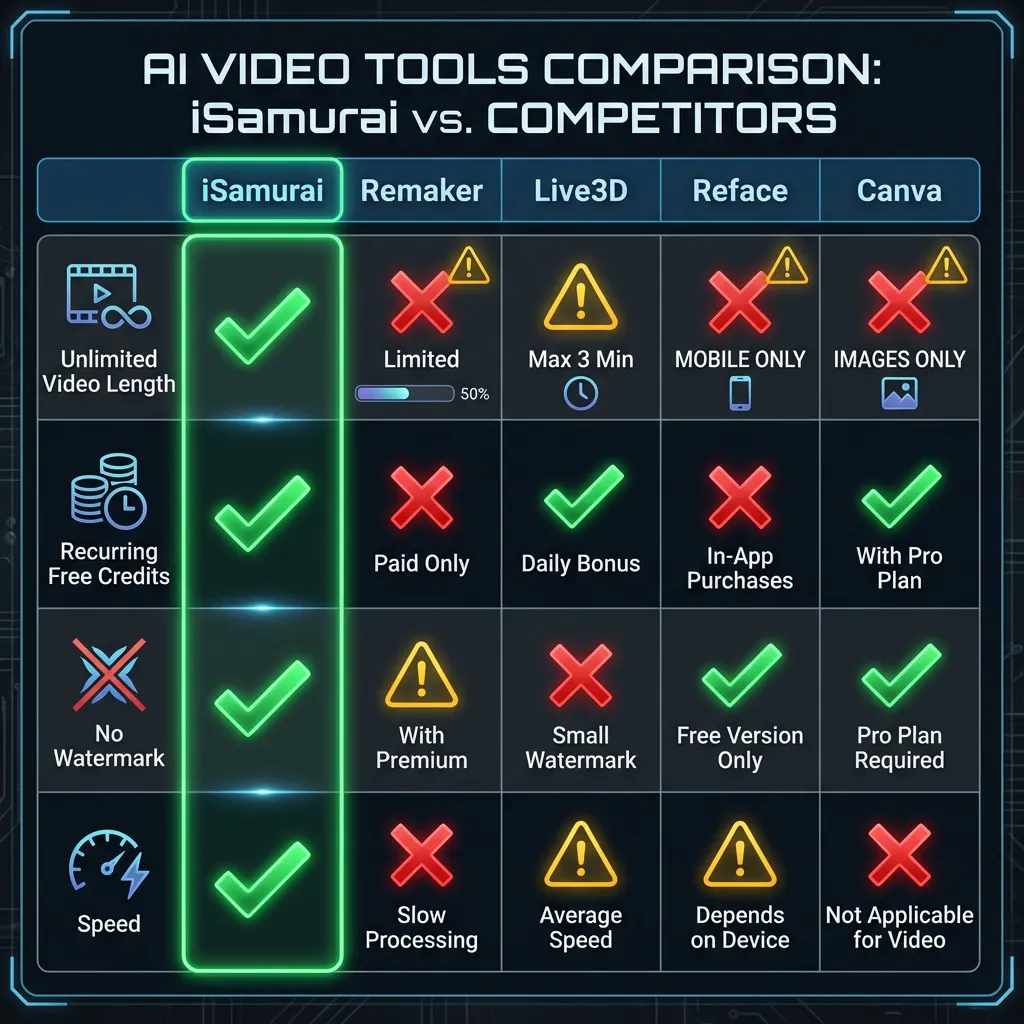
At a Glance: The Feature Matrix
Here is the data comparing the five services.
1. Live3D / VidMage
The “Quick & Dirty” Option
Live3D is widely available and often pops up for “VTuber” related searches.
* Pros:
* Fast for GIFs: Great for quick, low-quality meme reactions.
* Simple Interface: Very few buttons.
* Cons:
* 10-Second Limit: You cannot swap a full YouTube clip or scene.
* Pay-Per-Second: Expensive for anything longer than a GIF.
2. Remaker AI
The “Daily Login” Option
Remaker is known for its high-quality image swaps.
* Pros:
* Good Image Quality: Produces sharp static photos.
* Cons:
* Aggressive Queues: Free users face massive wait times.
* Daily Check-in: Requires daily engagement to earn “free” credits.
3. Reface
The “Mobile meme” App
Reface is famous for its mobile app, confusing many desktop users.
* Pros:
* Great Mobile App: Fun for swapping faces into movie scenes on your phone.
* Huge Library: Lots of pre-selected clips.
* Cons:
* Not for Customs: It is hard to upload your own custom high-quality video files from desktop.
* Expensive Subscriptions: They push a weekly subscription model (£5-10/week) which adds up fast.
* Watermarks: Free version has heavy branding.
4. Canva (Apps)
The “Image Designer”
Canva is a design giant, but its face swap is just a third-party plugin.
* Pros:
* Convenient: If you are already designing a flyer, it’s right there.
* Cons:
* Images Only: As of 2026, most Canva apps do not support high-quality video face swapping—only static images.
* Slow: The plugins are often slower than dedicated tools.
5. iSamurai
The “Creator’s Choice”
We built iSamurai for content creators who need reliability. We realized that a 10-second limit makes a tool a toy, not a utility.
- Unlimited Length: You can swap full scenes (e.g. 2 minutes, 5 minutes).
- 50 Recurring Credits: A monthly allowance that refreshes. No “daily check-ins”.
- Focus: We focus purely on face swapping.
Pro Tip: For professional edits, you can use our timeline editor. Read our Face Swap Studio Guide to learn more about multi-track swapping.
Frequently Asked Questions (FAQ)
1. Which face swap app allows unlimited video length?
iSamurai is the only tool in this list that supports unlimited video length (up to 5+ minutes). Competitors like Live3D force a 10-15 second limit.
2. Is Reface good for PC?
Reface is built for mobile phones. Using it on a desktop is clunky and often requires emulators or limited web versions. For PC/Mac workflows, a browser-based tool like iSamurai or Remaker is better.
3. Does Canva have a native video face swap?
No. As of 2026, Canva’s apps are primarily for static images. You cannot upload a video and swap faces inside Canva natively without using external integrations.
4. Why is “Daily Login” bad?
Tools like Remaker force you to log in every day to “claim” credits. If you forget, you have zero credits when you need them. iSamurai gives you a bulk 50 credits every month that renew automatically.
The Verdict
- For Mobile Memes: Reface is fun.
- For Flyers/Posters: Canva is convenient.
- For Professional Video Swapping: iSamurai is the only tool offering unlimited length and recurring credits without the “daily login” hassle.